

We often hear on projects or seminars that many customers are unsure about customizing a new evaluation path. Today we’d like to give you a step-by-step instruction how to create custom evaluation paths in SAP HCM, be it for Organisational management, Training and Events Management or any other PD Module based on Objects and relationships.
First of all: What is an Evaluation Path and what do we need it for?
The shortest Evaluation Path is the relationship between two object types. For instance a person is a holder of a position and a position is held by a person.
If there are to evaluate many persons out of an organizational structure, we surely need more of those relationships: e.g. from one organizational unit to another to positions and finally to persons. Evaluation Paths contain a sequence of object relationships.
With help of relationships you can create organizational structures (and structures in event management or personnel development). With Evaluation Paths you evaluate parts of the structures and get out a set of objects.
Standard SAP HCM contains a series of relationships and Evaluation Paths. For instance the relationship between a person and a position is called “Holder” relationship with code A or B 008. And all persons along an organizational structure will be evaluated with standard Evaluation Path PERS-O.
Among other occasions you will need a new Evaluation Path, if you have created an own object type which shall be reported or if your reporting or authorization concept needs a customer relationship because of your company specifics. Imagine a requirement where the leader of an organizational unit has to take the responsibility for other units for HR system purposes without being the disciplinal leader. In this case you have to create a new relationship which connects the position with the additional organizational units.
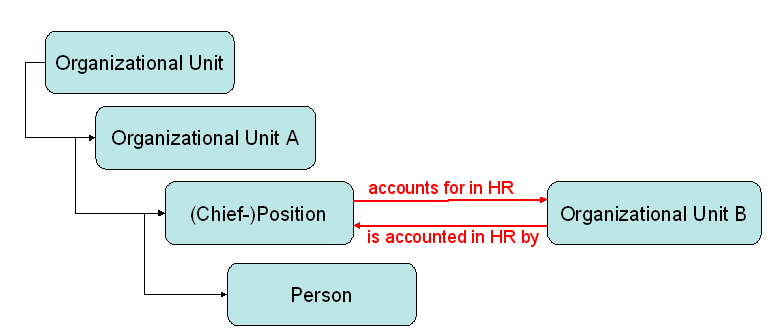
To display this structure you first have to create a new relationship. Then you define the new Evaluation Path. With this path you can evaluate all subordinated persons of organizational unit A and additionally all persons of organizational unit B. We will now explain the procedure of definition step-by-step.
1. Create the new relationship type as follows:
a) Choose the following path of the Implementation Guide: Personnel Management ► Organizational Management ► Basic Settings ► Data Model Enhancement ► Relationship Maintenance ► Maintain Relationships.
b) Create the new relationship using the customer name space. Start the evaluation path name with either „Y“ or „Z“. Choose descriptions for both directions (see Figure 2). Every relationship has two directions, one from the active to the passive object (bottom up) and reciprocal (top down). They are necessary to build up a structure. Also starting from an object you want to get to every other superordinate and subordinate object.
 c) In the same customizing area now define the allowed Relationships between the object types. Be aware using the right relationship direction A or B.
 d) Create the new subtypes of Infotype 1001 “Relationships” using the path Personnel Management ► Organizational Management ►Basic Settings ► Data Model Enhancement ► Infotype Maintenance ► Maintain Subtypes.
e) At last define the time constraint for the new subtypes. Using time constraint 3 for relationship direction AY01 a position can have many organizational units to account for. An organizational unit on the other hand can only be accounted by a single position – time constraint 2
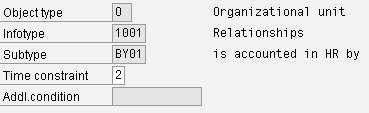 Result: In Expert Mode you now can maintain the new relationship between a position and an organizational unit. So you expand the structure of your organizational management.
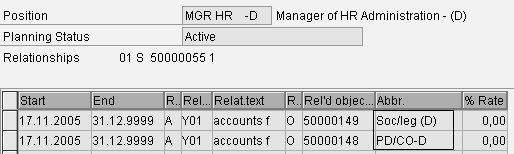
2) For displaying or evaluating the new structure you have to create a new Evaluation Path:
a) Choose the following path of the Implementation Guide: Personnel Management ► Organizational Management ► Basic Settings ► Maintain Evaluation Paths.
b) Create a new Evaluation Path using customer name space „Y” or “Z”
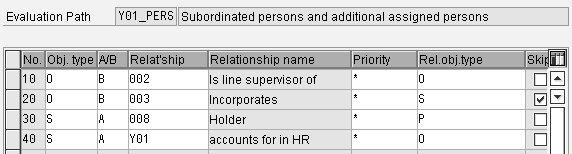
 c) Then choose Evaluation Path (individual maintenance). Have a clear image of your organizational structure! Selecting an organizational unit – which relationships are on the way to the subordinated and additionally assigned persons? Those are the relationships:
- between two organizational units (No. 10), between an organizational unit and the assigned positions (No. 20),
- between the positions and the holders (No. 30) and
- between the positions and the additional organizational units (No. 40). No. 10 to 30 again evaluate all subordinated organizational units, positions an persons (see next Figure).
The sequence of table entries is not relevant for the selection of the results – only for display order. In the Skip field, you specify that a particular relationship is to be included in the evaluation path, but that the second object type in this relationship is not to be displayed.
 Result: With help of report RHSTRU00 you can display the output of the new Evaluation Path (see next Figure). Our sample organizational structure contains a root node (“Human Resources”) and four subordinate organizational units (“Personnel Administration”, “Personnel Development & Controlling”, “Social and legal”, “Personnel Training”). As you can see in the Figure further above the Manager of “Personnel Administration” additionally accounts for the units “Personnel Development & Controlling” and “Social and legal”.
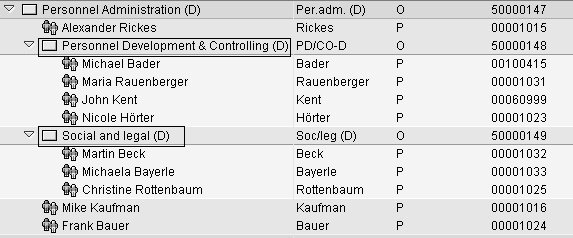 Compared to this, the output without using the custom relationship Y01 (selecting standard Evaluation Path PERS-O “Persons along an organizational structure”) looks like this:

If you are interested in next generation HCM reporting from SAP, check out this blog series on SuccessFactors Reporting Tools


Hallo,
thanks for your post. I am wondering if this method is also useful when I would like to grand authorization based on payroll area. In my company payroll area is used to determine the location of person. Access to personel data should only be allowed within same payroll-area. Any idea if evaluation-path can be used here?
Thanks.
Hello,
I don’t see any need for evaluation paths to implement your requirement. I have got the following alternative solutions for you:
1. Implement authorization object P_NNNNN and add field payr. area to the field group. You might want to replace P_ORGIN by P_NNNNN. Otherwise you always need to maintain both objects in your authorizations. This is quite an effort, since you need to adjust all of your authorizations.
2. If you are already using structural authorizations you can create a profile for each payroll area and assign the profile to the administrator. In the profile you leave the evaluation path empty and identify all persons by payroll area by a custom function module (copy RH_GET_ORG_ASSIGNMENT).
If you need more information on that why not join my authorisation session at iProConference on 6./7. May.
Best regards,
Anja Marxsen
Hallo,
thanks for your post. I am wondering if this method is also useful when I would like to grand authorization based on payroll area. In my company payroll area is used to determine the location of person. Access to personel data should only be allowed within same payroll-area. Any idea if evaluation-path can be used here?
Thanks.
Hello,
I don’t see any need for evaluation paths to implement your requirement. I have got the following alternative solutions for you:
1. Implement authorization object P_NNNNN and add field payr. area to the field group. You might want to replace P_ORGIN by P_NNNNN. Otherwise you always need to maintain both objects in your authorizations. This is quite an effort, since you need to adjust all of your authorizations.
2. If you are already using structural authorizations you can create a profile for each payroll area and assign the profile to the administrator. In the profile you leave the evaluation path empty and identify all persons by payroll area by a custom function module (copy RH_GET_ORG_ASSIGNMENT).
If you need more information on that why not join my authorisation session at iProConference on 6./7. May.
Best regards,
Anja Marxsen
Hi ,
Instead of creating a relationship, is it not better to create a new position?
That position may then be added to the org units.
I am not sure about the requirement to create a new relationship in the example you presented? Is it only to reduce the overhead of adding the position to multiple org units?
Best.
Hi,
Of course it depends on your requirements. However, creating new positions would in the vast majority of cases make your Orgmanagement useless for most purposes except for the one you create the position for. If it is the normal job of one employee to do perform variosu tasks for org units other than the one he or she sits in, than using a new relationship is the only way to achieve this without misrepresenting your actual organisational structure. After all, capturing time data for a particlar team doesn’t mean you have to be part of that team.
From the nature of your question I assume you are just in training and haven’t had any practical experience with OM yet – or just in one very narrow example, right? As you go along, I recommend you watch out for the multitude of purposes Orgmanagement usually needs to serve and think about how this can be doen whilst still having a proper representation of your Orgchart in the system. You’ll find that the text book idea of an orgstructure, where all processes in an organisation forllow the same structure is far from any real world situation.
Hi ,
Instead of creating a relationship, is it not better to create a new position?
That position may then be added to the org units.
I am not sure about the requirement to create a new relationship in the example you presented? Is it only to reduce the overhead of adding the position to multiple org units?
Best.
Hi,
Of course it depends on your requirements. However, creating new positions would in the vast majority of cases make your Orgmanagement useless for most purposes except for the one you create the position for. If it is the normal job of one employee to do perform variosu tasks for org units other than the one he or she sits in, than using a new relationship is the only way to achieve this without misrepresenting your actual organisational structure. After all, capturing time data for a particlar team doesn’t mean you have to be part of that team.
From the nature of your question I assume you are just in training and haven’t had any practical experience with OM yet – or just in one very narrow example, right? As you go along, I recommend you watch out for the multitude of purposes Orgmanagement usually needs to serve and think about how this can be doen whilst still having a proper representation of your Orgchart in the system. You’ll find that the text book idea of an orgstructure, where all processes in an organisation forllow the same structure is far from any real world situation.