

When building more complex custom developments, we often recommend the use of custom config tables to keep developments more flexible, requiring fewer coding changes. The other day, I came across an old problem with time dependency in custom tables again at a customer, and thought it worth sharing.
We sometimes observe that, when custom tables with date fields are created, they lack the appropriate Delimit button; or that the Delimit option is incorrectly configured. The most common way you may notice this is that, when trying to create a new future-dated entry for your table (e.g. creating a new monthly or yearly entry), you will encounter difficulties: either the Delimit option is not available; or a row being delimited will be incorrectly deleted; or there will be an error over conflicting keys.
This is usually caused by incorrect configuration of the Table Maintenance view.
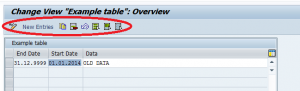
In the above example, there is no delimiting option
The option to generate Time-Dependency is available in the „Generate Table Maintenance“ view.
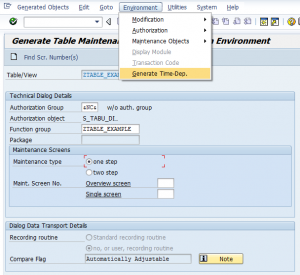
Generate Time-Dependency
However, this may not be enough – we often observe bugs and incorrect generation of screens (see (1) below). In this case, it may be necessary to delete and regenerate the screens and views from scratch, ensuring the correct data elements are used. If in doubt, use elements VIM_ENDDA and VIM_BEGDA for the end and start dates, as below.

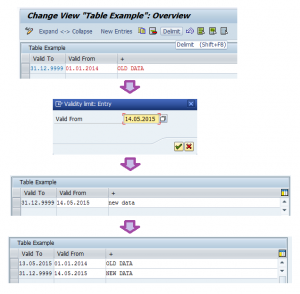
The result, when correctly configured, will result in a Delimit option that functions correctly, as demonstrated below.
References:
(1) Activate Delimit in Table maintenance view: http://scn.sap.com/thread/982001


Thank you for this post.
I have created a maintenance program for maintaining a custom table. I want to embed the delimit logic in my program, as i have both start date and end date as keys.
could you please help?
Hi Narender,
No change in logic, whether it’s a custom table or not. In an ABAP to manipulate the data, you can never just change a key field, so if both dates are keys you copy the old entry to you new target key and delete the old one.
However: it’s not really „delimiting“, because that doesn’t really say anything, if both dates are keys. Because that means your data model says yo can have entries with otherwise same keys and overlapping time periods.
Are you SURE, this is the case. In most cases I see custom tables with start data as well as end date being key fields, this is actually not properly implemented. If you actually need entries to be in a sequence (when the word „delimit“ makes sense) only the end date is a key field.
If you check most standard tables with time ranges, you’ll se that this is the case for them as well.
Got nothing to do with custom tables or ABAP. Just basic data modelling principles, which apply here as well.
hope that helps.
best wishes
Sven