

Comments are a note of fact or opinion, or a remark of attitude towards the Goal, and the comment field has now been improved to allow users to edit or delete their own comments. Users can collapse or expand the layout and edit or delete their own comments saved with a date-stamp and username. Previously, the field becomes read-only after it is entered.
The existing comment field in v12 goal plans now includes a new user interface/treatment that allows users to edit or delete their own comments.
If you have an existing goal plan and do not have comments configured to this goal plan, the new comments will not be applied to the goal plan. You will need to update all SuccessFactors Goal Management (GM) form templates before you can launch new forms.
To enable users to add comments, you need to configure this feature in the XML template and in Provisioning with these simple steps;
1. Configure the field in the XML template as follows: comments, Comments
2. In Provisioning, select Enable Goal Management V12 – requires „Version 12 UI framework (Revolution)‘.

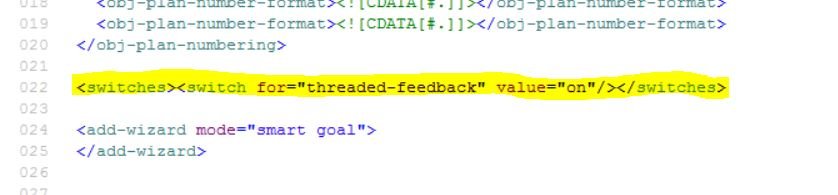
3. Configure the newly added switch and turn it on in the goal plan template as follows:
Note: Make sure to provide the required Read/Write permissions to Employees, and also Manager (in different goal plan status)
Threaded Comments in Employee Goal Plan
The Employee/Manager is able to enter comments with details and the system captures Name and Date. Comments can be edited or deleted, and these comments are also reportable.

Click here to request a SuccessFactors Demo


Hi Sven,
I added the permission to read and write the comments by employee and manager in XML doc and trying to upload in provisioning,am facing an error as, at line xxx,at column xx the element comment should be there. Whereas which ever the line xxx it is giving error is end of the doc
I have did all these but not able to see the comment option ongoals.
May I know where should I give the field definition section in the whole XML document.