

It was always a problem for SAP HR users to find the right work schedules to assign in infotype 0007. As a result, quite often new work schedule rules were created, even though an appropriate one already existed.
The new work schedule finder will make this less painful in future, as it allows to specify a variety of search criteria when looking for a work schedule rule.
The Work Schedule Finder has been developed by SAP as part of their Customer Connection program. It became available through note 1795844 or ideally through support package 95 for ECC6 (or the equivalent support packages for other versions). There have been a few corrections since. For most customers it does bring a real benefit at very little effort, so we do recommend to switch it on and to inform users on how to use it.
The Work Schedule Finder is easily accessed through a button in infotype 0007, which can be used instead of the normal value help (F4). The following pop-up window allows you to specify criteria for the work schedule you are looking for, such as:
-
Planned working time per day
-
Start or end of work per day
Break times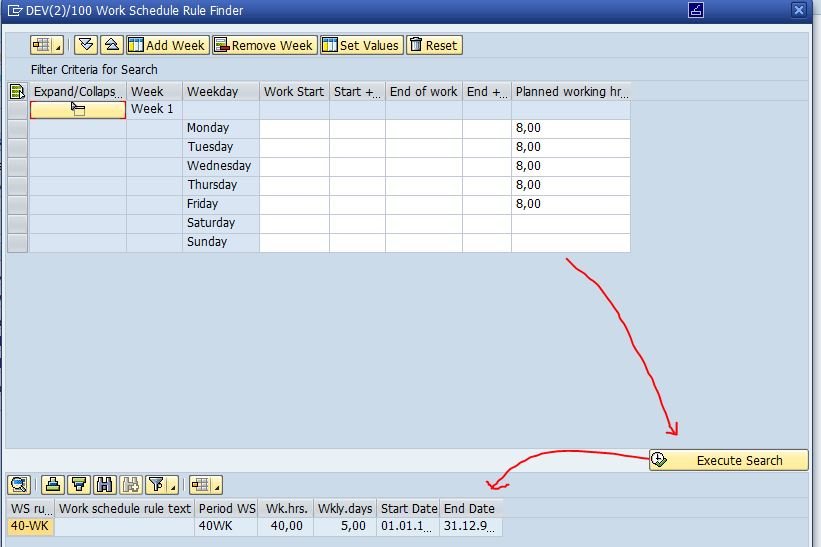 The button „Set Values“ allows you to set the same values for a number of days and through „Add Week“ you can add more days to your selection criteria, in case your shift cycle is longer than one week. Ah yes, one little tip: double-clicking on the result doesn’t select it as field-input. Instead, you need to mark it with the mouse cursor and then transfer it using the usual „ok“ button with the green tick in the lower right corner of the window.
We’ve observed some false hits occasionally, which I assume are teething problems soon to be sorted out, but other than that users love it.
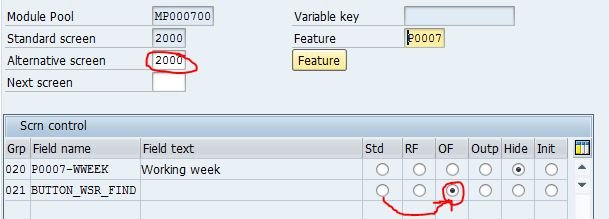
If the required support package or notes are applied, all you need to do is switch the button on in table T588M (assuming you are using standard screen 2000 in infotype 0007 – use screen number 2012 for Belgium):
 That’s it. A quick way to make your users a little bit happier :-)

