

The Online Report Designer (ORD) is an embedded Reporting Tool in SuccessFactors. It’s part of the SuccessFactors Foundation package, and available for every customer no matter what module you have purchased. The Data Source is the same as for Ad Hoc Reports, but it offers much more functionality. You can enhance your reports with several visual features, such as custom layout for tables, charts and pivots, and are able to use cross domain queries. Moreover, LMS is available but I will tell you more about its capabilities and limitations within ORD later.

Online Report Designer in SuccessFactors
Online Report Designer is a fully self-service, easy to use, non tech reporting tool, available within your SuccessFactors solution that allows you to build your own customizable reports using the data captured across domains. The ORD platform has advanced filters, calculations, and visualizations to ensure that you extract the most valuable data and understand how to most effectively use it to drive your business strategy. Plus, with Report Distributer, you will be able to automatically provide decision-makers with the information they need, at the exact point in the cycle that they need it.
Important Note: The ORD needs to be activated for your Instance. Please contact your Implementation Partner for this. (For Partners: How to activate ORD)

Nevertheless, the Online Report Designer is not the solution for everything and has its limitations. Especially for the Learning Management Module (LMS), as the reports were built in the Plateau Report Designer (PRD) in LMS. PRD is a modification of BIRT by the way, (and you can read more about BIRT here). LMS Data is pulled directly through API from the live LMS database. Lets have a look of the general limitations of ORD…
ORD Limitations:
- Data Manipulation – Does not support the writing of SQL statements within the query
CSV output is not supported, multiple worksheets not supported in Excel output, and graphs not supported in Excel output (tables only)Scheduling/Distribution – Does not currently support FTP scheduling or run offline to excel/non-PDF formats
See comment from Lyndal Hagar (Principal Product Manager – Workforce Analytics & Reporting) also recommending Reporting: Recent Innovations for latest updates and road map.
Functionality & Features of ORD in SuccessFactors
You could write a book about all the functionalities and features of ORD. I will give you two overviews of the Online Report Designer.
Understanding of Functionality & Features in ORD
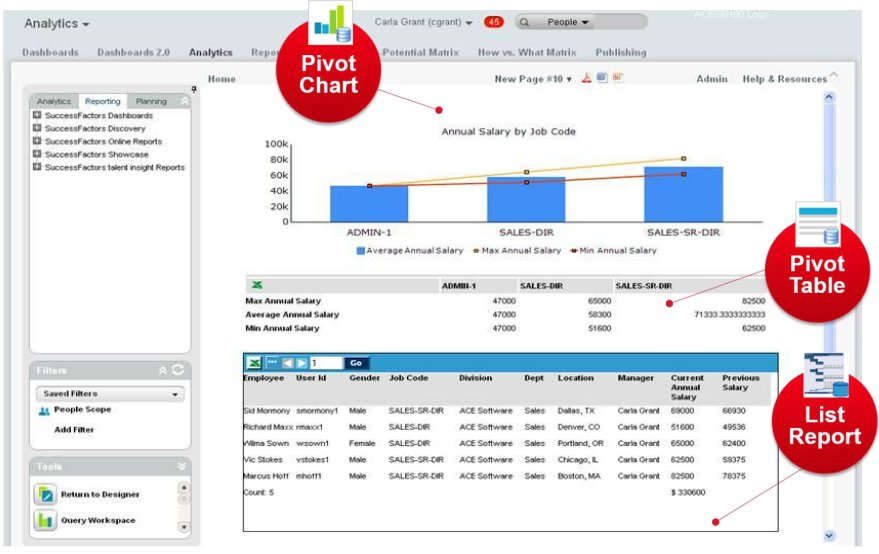
ORD provides Self Service. All users, who are given permission rights, are able to build reports from within Online Report Designer tool. The Reports are Formatted & Presentation Ready. This means you can visualize queries in tabular list format, as pivot tables and in a wide variety of chart styles. ORD Reports are Exportable in PPT, PDF, Word, and Excel, and it’s possible to schedule and send via email. Probably the most important for customers, is the Customization available. You are able to re-label fields, use custom calculations & concatenate fields, If/Then/Else statements, hide duplicates, transpose rows to columns and much, much more. To get an impression of an ORD Report I want to show you a report:
Overview of functions & Features
As mentioned above, it is impossible to describe every function available in ORD in detail. I will cover more of the features available in a further article. In „Detailed Reporting“ you can build queries in a so called List Report Component. It is one of the most important things to understand, as data in any form is pulled and created. Setting up filters, aggregations and custom columns will be part of it. Not to forget the Report Designer Tool where you can create tables, charts, pivots and much more. To give you an idea about the variety of functions, I want to share this overview with you:
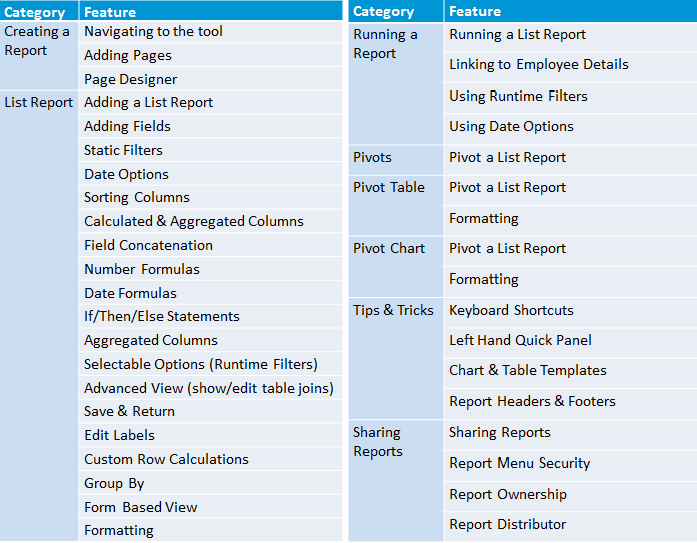
I know this looks like a lot, but it is probably not all you can learn in the Online Report Designer. In a more general summary, I would summarize the features & functionality as:
- Cross Domain Reporting
- List Component
- Calculated columns (formulas, concatenation, conditional logic, etc.)
- Formatting tips and conditional formatting
- Subtotals
- Runtime filters
- Actionable Analytics
- Pivot Tables
- Charts
- Scheuduling
- Dynamic Sharing
- Adding the report the the custom menu folder
ODS & Advanced Reporting with ORD in SuccessFactors
When you hear about the Online Report Designer, you also hear about ODS and Advanced Report. The similar names cause a lot of confusion, which why I would like to label it as „EC – Advanced Reporting in ORD„. Employee Central (EC) has a special need for data to be consumed in a time respective manner. This is one reason why EC has a special name and area in ORD. Employee Central customers will work with ODS (we will talk about it later). SuccessFactors also offers several standard reports out of the box for Employee Central Customers in ORD. First of all I want to mention the data schemas for EC customers in ORD:
Understanding Advanced Reporting with ODS
ODS (Operational Data Store) is another Data Source for Employee Central Data. All EC Advanced Reporting customers have a live data replication between BizX and Advanced Reporting (ODS). Replication is continuously running! Change records are replicated across in a trickle-feed type manner and processed into the ODS. Normally the data will be replicated automatically in minutes, but in case of high traffic and other circumstances it could take up to an hour as the worst case scenario. That is why SAP typically recommend a replication window from a couple of minutes to two hours.
Employee Central Standard Report Templates for Advanced Reporting
SuccessFactors is getting popular for their best practice concept with a lot of out of the box content and a great Simple to Run philosophy. You won’t miss them in the Online Report Designer. Again, there is so much functionality available and too much to cover in just one article. But here are the report topics and number of reports, which are available as a Standard Report in Advanced Reporting:
- Employment Information (11)
- Benefits (4)
- Compensation (12)
- Global Assignments (2)
- Payroll (1)
- Personal Information (7)
- Pension Plans (1)
- Time Management (6)
- Position Management
- Workflow Information (3)
- Country Specific Report Templates (xx)

Pros & Cons of ORD Reports in SuccessFactors
The Online Report Designer is a great tool which is included in the Foundation package and available for everyone to use. It closes the gap of cross domain reporting compared with the Ad hoc Reports and also offers a wide range of visual options. Personally, I still prefer YouCalc for Dashboards. I like to compare BIRT to ODS, however both tools require extra training. Also, ODS gets a slight advantage because it is included in SuccessFactors and gets more support. Lets have a look to some more Pros & Cons of the Online Report Designer:
Advantages
+ Internal tool with SuccessFactors Support
+ Free (part of Foundation) and available for every customer
+ Cross Domain Reports
+ Basic and advanced options for visualisation
+ Custom columns, calculations, conditions and logic
Disadvantages
– Usability
– Required Learning & Skill Training
– Limited LMS Data
– Performance can be poor and unpredictable
This Article is part of a series in “HR Reporting and Analytics in SuccessFactors”
- HR Reporting and Analytics in SuccessFactors – Part 1
- Standard & Ad Hoc Reporting in SuccessFactors – Part 2
- Visual Reporting with Dashboard 2.0 Reports in SuccessFactors – Part 3
- Visual Reporting with BIRT Templates in SuccessFactors – Part 4
- Advanced Reporting & Online Report Designer in SuccessFactors – Part 5
- Workforce Analytics Module in SuccessFatorcs – Part 6
SuccessFactors Training and Demo
You still don’t have enough and want to learn more? We offer various SuccessFactor Reporting Trainings. If you have bespoke training needs, the packages can be adjusted accordingly. Just ask – we are happy to help. Same counts for a SuccessFactors Demo. Accordingly to your requirements we prepare a SF Demo to show how things work and what options you have.


Does ORD allow customers to create reports based on a time stamp? For example, I have a business requirement from the time a requisition is submitted until approved is 5 business days. Can I track and report on this in ORD?
Great articles. Loved reading through all of them.
I would need to prototype, but at the moment I would take the date (of submition) for the calculation and build a additional Field to track the Time and Filter on it. Should be possible.
well put together article; at no point i had any confusion :)
PLease add in Disadvantages, that there are lot’s of duplicate entries when creating a Cross Domain report.
If you buid a several domains report you migth even have 5 recods repeated.
Detailed reporting has an option to „remove duplicates“ bur Advance reporting does not have that option.
Another dissadvantage is that you are not able to create a calculated column out of a boolean field, only Date, Text and number.
Another one is that when dowloading a report to excel file, the boolean column dissapeares (is downloaded blank). And the date is downloaded in a different format (different than on the screen).
Nice Article Nice article though!
Regards,
Thanks Moa! You mention some good points. In 2017 there should be several changes with the Report Center… I think some of the problems get fixed. You have a business case where you would need to calculate a column with a boolean field? I consider boolean fields more for logic, but curious to hear how you would use it.
I guess in some cases I would prefer the Integration Center (for exports) instead of ORD…
Thanks for the great comment!
Can you pull a query created in ADhoc reports and put it into ORD?
Hi All,
In my SuccessFactors Employee Central duplicate entries created with same First Name , Last Name and DOB fields.
In ORD reporting is there any possible way to extract the USER without any duplicate entry i.e filter on First name , Last name & DOB field.
Please suggest.
Thanks in Advance.
Regards,
Mahesh Dudam
Yes, there is, but the first question you have to answer yourself is why there are duplicates?
Is there a wrong join? Are multiply entries of the user normal?
Check the Table joins! Check Distinct User Options in the Guidebook.
Hi Mahesh,
is your issue fixed? I am also facing the same.
Regards/Suhas
Hi Mahesh, Suhas,
ORD has LOTS of duplicates records.
It depends on the joins that you make.
If you join position with employee, you will get duplicates no mather which join you use. (there are only 2 join options)
What you can do is to add filters.
Add all the collumns and find a difference, then add a filter for that column.
In most cases, the problem will be solved with the filter.
A greate dissadvantage of Advance reporting is the duplicate records if you build a cross domain report.
Kind regards,
Ale
How can I enable ORD in the successfactors demo instance
You need a Partner who can activate ORD in Provisioning (The Backend for SuccessFactors). If you are a Partner there is a Guide in JAM.
Hi,
Can you let me know how do we load external datasource (excel) to Workforce Analytics?
This is not related to ORD, but external data sources for WFA are explained in the Admin guide. See partner portal or support portal.
Great and informative blog. Learnt quite a bit ! Looking forward for the next in the series – WFA.
As far as I’m aware, you need a WFA instance integrated in your instance to work with ORD in a sales/demo instance
Great blog! Can you please tell me what reports from the SuccessFactors Learning Application are supported by ORD (if any)?
Thanks!
You mean the Standard Reports, which are available in LMS? They are created with another Tool called PRD (Plateau Report Designer) or BIRT. Never the less there are no Standard Reports for LMS in ORD yet.
Hello there! This is a amazing blog!
You guys can answer me a question?
How can i share de reports ORD with others users ?
> Go to Online Report Designer
> Select Report (just click on it)
> find „File“ on the left handside (second box)
> You will find the option „Report Sharing“
You can share an ORD Report with single user or following Logic: Department, Division, Location, BizX Role, Employee Type, WFA Role
Hello there! This is an amazing blog, I’ve learned a lot!
I have a question though… It is possible to upload external data to Workforce Analytics Module?
What I mean is join or merge SuccessFactors data with other databases, csv files, etc.
I’m looking forward to the part 6 of your reporting series :)
Thanks a lot!
Hey Kat,
yes you can add a external data source to WFA (Workforce Analytics). Mostly its a BW, but also possible, to add other data sources. In ORD (without WFA) it is not possible. I have most of the stuff collected for the next series, but I will try to get the Certification there first.
Feel free to contact us for further questions =)
Regarding some of the ORD Limitations listed, CSV is supported (as of Q3 2014) and scheduling/distribution to FTP is also supported via the Report Distributor tool. Run offline is available to all users where they can pick up the Excel/CSV file from their personal „Report Distributor Downloads“ folder or a Report Distributor user can run any report offline to any format (PDF, DOC, PPT, XLS, XLSX, CSV).
There is a good „Reporting: Recent Innovations“ doc & video here: http://community.successfactors.com/t5/Reporting-and-Analytics-Product/Reporting-Recent-Innovations-amp-Roadmap/ba-p/104899
Its really nice article ..
„Workforce Analytics Module in SuccessFatorcs – Part 6“ is greyed out here in your article page
can i have some blog like this to understand WFA and WFP much better
I will work on an article about Workforce Analytics Module in SuccessFatorcs soon.