

In Cross-Application Timesheets, enhancement CATP0001 lets you set your own target hours for the Time Sheet. However this completely stops the default reading of target hours; if the enhancement returns even one line of target hours, none of the default reading will take place. So, how can you change the Target Hours, starting with the default hours as a base?
We assume you know how to create enhancement CATP0001; if not, that’s the topic of another discussion.
The code supplement for the enhancement is created in include ZXCATPU01. You could then call the target hours using the function module ‚CATS_GET_TARGET_HOURS‘; however, this function module itself calls the enhancement CATP0001 – leading to recursion. It’s thus necessary to stop that recursion, to allow the function module to get the target hours without being impacted by our enhancement.
This is done by using a flag in memory. If recursion_flag is set to true, the enhancement’s logic will not be executed.
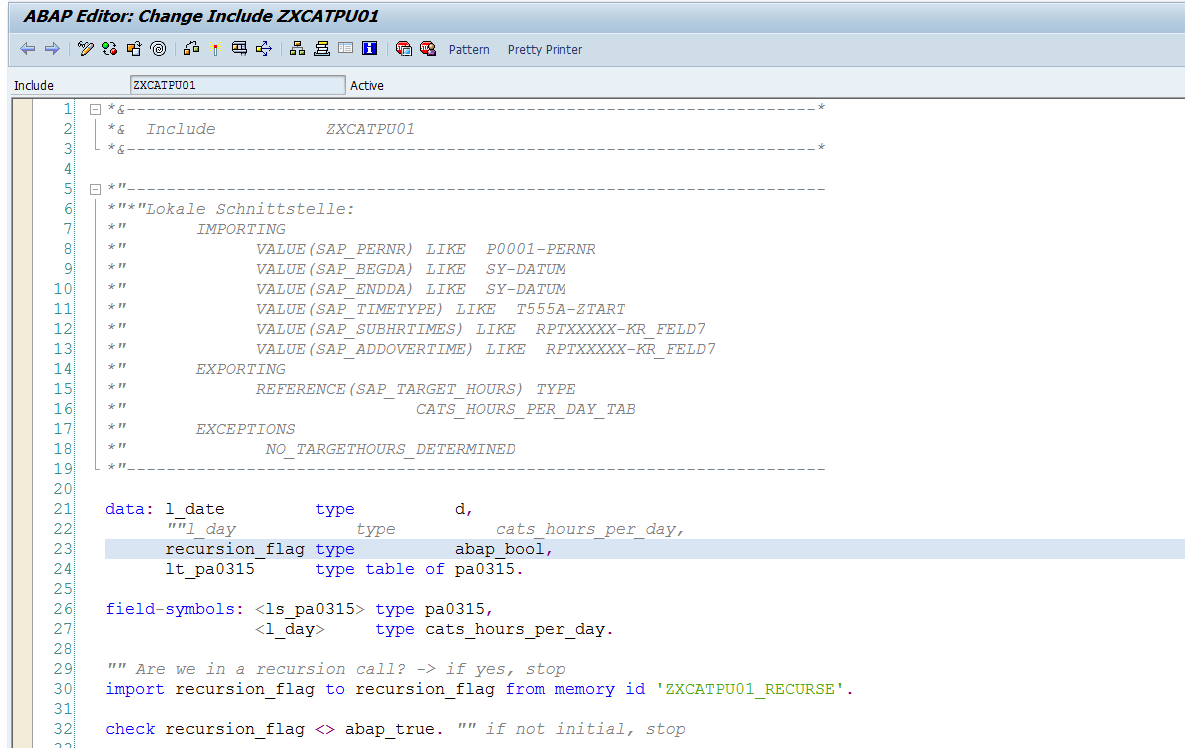
You may have further conditions before triggering the enhancement’s logic; these should be done next.
Finally, we need to use CATS_GET_TARGET_HOURS to get the original target hours; but first, we set the recursion_flag to true.

The result of this will be that your SAP_TARGET_HOURS table will now contain the original default target hours; you can now edit these according to your own logic!

