

We think that Concur is a great Expense solution, and I am excited to see Concur continuously improving and streamlining processes. Let’s take a look through some of the new features including Outlook meeting integration and traveller messaging that you can easily use to enhance your expenses processing.
One new exciting feature for Concur is the ability to add in meeting attendees onto your entertainment expenses directly from the Outlook meeting appointments quickly and easily. Simply add receipt@concur.com as one of the meeting attendees and this will create an expense for the meeting. That’s all there is too it! You are probably already using the receipt@concur.com address to forward any e-receipts too to attach to your expense.
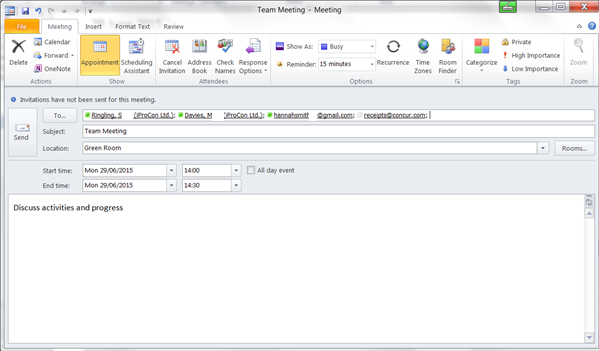
On the actual expense itself, Concur recognises any of your colleagues attending and lists anyone else as a business guest by checking the email addresses entered on the Outlook meeting request. You can then make any changes you need to the attendees or just go on to complete the necessary expense details, as your normally would. It also pulls through the subject of your meeting through to the business purpose field on the expense to complete more fields for you initiatively.
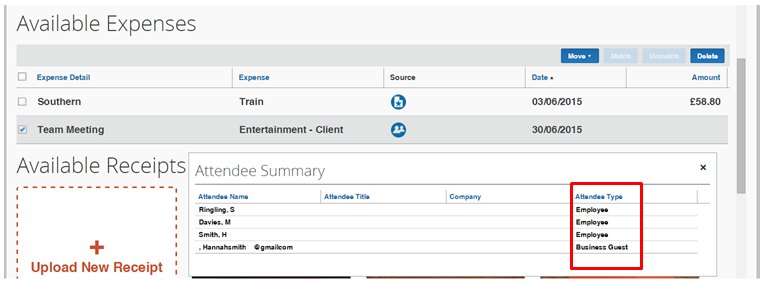
It is even clever enough to keep up with changes if the meeting date gets changed to another date, from 30/06/15 to 01/07/15 here:


Or even delete the expense if your meeting ends up being cancelled! We had previously found that the expense entry was not able to keep up with any changes to the meeting date or the deletion of the meeting, and so it is great to see Concur keeping in touch with their customer requests and suggestions for development so closely.
For those business guests that you find you are adding onto your expenses on a regular basis, and other external colleagues you might need to engage on a short term basis you can now set up in your Concur as a sponsored guest user. Once set up, these colleagues can use Concur in exactly the same way that you internal colleagues would use it, and you can manage and monitor their expense spend the way you do now. An inspired idea to extend the benefits of your Concur implementation across all your expense processing including any outside parties.
Concur messaging is a great little feature that lets you keep in touch with where your team are, and anything they might need to know such as letting a colleague know that their flight is delayed, details for onward travel or important world events that could impact their travel. Encompassing duty of care responsibilities right down to be able to give your colleague a bit of local knowledge to get around with. There is new and improved functionality to create rules around variables such as the airport being flown too or the traveller type. So for a colleague who has not flown into an airport before you could let them know the best way to get into town to reach the office, or their hotel after a long day travelling without bombarding other colleagues who call that city home and know how they get around already. Who hasn’t been lost in an unfamiliar airport when you can see a train station for your onward travel but just cannot get at it or be flummoxed as to whether taxi, tube or bus is the best way to continue your travel onwards.
There are also some useful new country specific reports, including a UK VAT analysis report to analyze unclaimed VAT amounts, and information on browser compatibilities with Concur, across IE, Chrome, Firefox and Safari
Check out Concurs Product Improvement Highlights, and if you are thinking about redefining your Travel and Expense processing, get in touch with us to see how Concur could help.

