

Another quarter and another round of great improvements and developments have been released for Concur Travel, Expense and Invoice including new travel partners, new functionality for cash advances and Concur app connectivity.
There are some great new travel provider direct connects for Concur Travel, including Southwest airlines for your US travelling, Rakuten travel for hotels in Japan (including many hotels that are not available through the GDS) and with Execucar for your private car transportation needs across North America and Europe. New Triplink partners have been added to now including Etihad Airways, Hotel Tonight and Omni Hotels & Resorts. With more direct connect and partners being added all the time, Concur Travel is keeping the flexibility and ease of use that makes the software so great and giving you all the policy control to manage your companies Travel and Expenses effectively.
If you are using the cash advance functions Concur have added a separate workflow capability for cash advance, much the same as the workflows that you can set up for the Concur Expense module. When requesting a cash advance, your employees can now attach a document to give further information as to the request and also now recall a request for a cash advance if it turns out to be no longer needed. The improvements added are from the request and solution subbmissions in the Concur Support portal, showing that Concur listens to their customer base and provide developments in direct line with customer usability needs. The cash advance is a feature of the Concur Professional version only.
One of the features I am really a fan of with Concur is the delegate settings which has now been extended over to Concur invoice. Using delegates in Travel and Expense allows you to book travel or submit expenses for colleagues who are outside of your company but have expenses for your company to pay, or travel with your internal colleagues. It’s a great feature that takes out the hassle of paying expenses or organising travel outside of your internal streamlined Concur processes. If you are using the invoice module, you can set up external colleagues as delegate as your do in the other modules allowing external colleagues to use all the great features and functionality of all the Concur modules.
The Concur app is really easy to use and has now been improved to offer connectivity of the service apps that link with Concur Travel and Expense. These have always been available in the web screen for Concur under the App Centre tab, but now you can add these integrations on the move.
Simply open the Concur app, chose the connect to apps from the main menu:

Chose your app within either Concur Travel or Concur Expense:
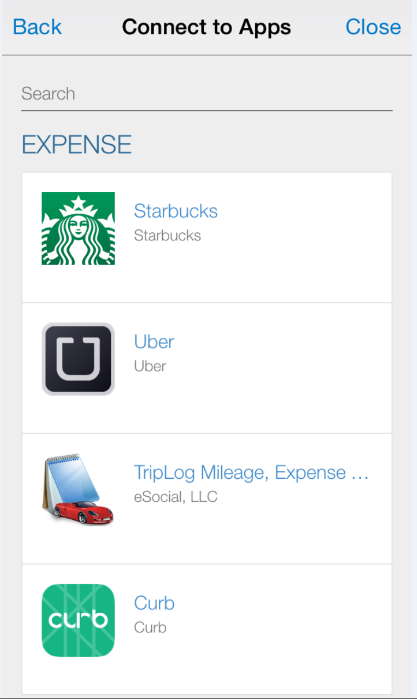
Chose to connect and Concur will then redirect you to the account you have chosen to connect, log into that account and then you are all done!
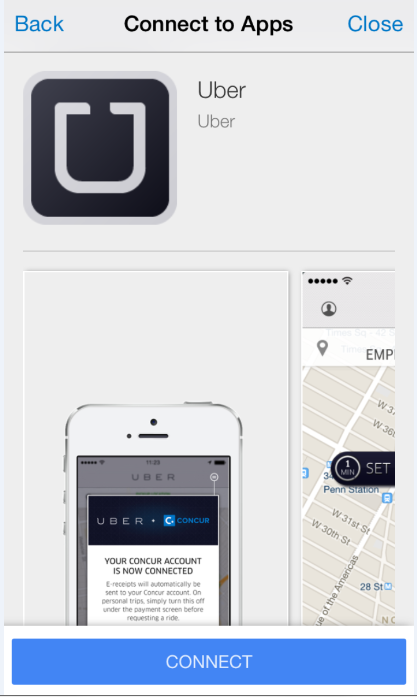
As usual with Concur Travel and Expense functionality, the steps to link your accounts are easy, straightforward and streamlined. All of your receipts and other relevant travel or expense details will be automatically sent into your Concur modules saving your time and effort in importing them or creating them in Concur yourself.
If you have not seen Concur as yet, or would like more information about improving your Travel and Expense processing, then please get in contact with us today.

