

Another month, and another round of enhancements have been released by Concur. The latest improvements released cover both new functionalities and minor improvement that enhance your Concur user experience – most notably for on-behalf and substitution scenarios. Lets take a look over some of our favourite enhancements from this month’s round of releases.
Improvements for Acting or Booking for other Users
The functionality to act for other users in your organisation, whether it be booking some travel for them or processing expenses items, is a really smart feature in Concur. This month, Concur have released various UI features for the proxy functionalities.
First and foremost, the display of when acting for others has been made more prominent and clearer as to whom you are acting for in that session.
Once you have selected the user, Concur clearly displays the other user selected to help you ensure that you are performing the right tasks on behalf of the right user:

The search function in finding the correct user to act on behalf of has also been improved, including the addition of the recently accessed users to help you with any users you proxy for on a regular basis.
One really impressive new feature is the ability to pause your acting on behalf sessions to carry out any administrative duties that might come up right when you are in the middle of arranging some complex travel arrangement. You can pause and retrieve the arranger session, right where you left off.
Here, whilst arranging travel for another user in my company, an urgent administration type of task has been requested in the middle of my travel arranging. It would be frustrating to lose the travel information that I am in the middle of arranging, instead, I can simply pause my Concur travel session to carry out the admin task.

By accessing the Adminstration menu, Concur has automatically paused my traveller arranger session as indicated by the pause icon on the delegate navigation option:
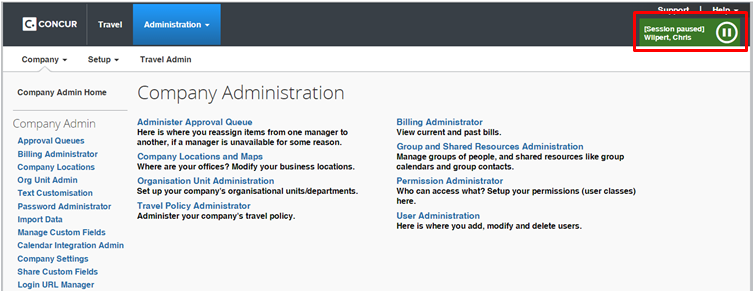
Once my admin task has then been completed, I can resume my traveller arranger session right where I left off – again using the delegate navigation option and clicking on the play symbol.

Which then takes you back to your travel arranger screen. A neat feature addition to the already useful arranger functionality.
Approval Substitutions for Travel
A great new feature that Concur seemed to have released on the quiet, is a new approval substitution feature for Travel. This was not included in the September monthly release notes, but released in a separate document on the Concur Support Portal even though it is a great new feature! This also goes to show how useful the Concur support portal is.
The option can be found under your profile settings. Simply chose the substitute user to cover approvals whilst you are away and click on the submit button.
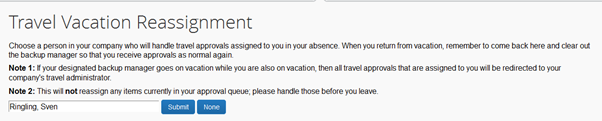
A message box then confirms that you are happy to apply a substitute for approval:

Once you return from the absence, you must then remove the substitute approver.
In a slightly less intuitive process, you must either remove the substitute name or click the none button and then submit that – i.e. you are submitting that there is no substitute.

Again, an information message to confirm that you are this time removing the substitute approver:

One key point to note, is that the substitution is not created with any validity dates, as SAP users might be used too. So, the substitution will not run out of validity but must be removed once you return from holiday. Substitutions can only be enabled or disabled by an approver or manager – any administrators or travel arrangers cannot perform any substitution activities. So make sure your users know how to set and remove their substitutions, as you cannot do it on behalf of them!
There are in fact a number of new options to be found in the profile settings, including new system settings options, mobile registration app connectivity details and section 508 compatibility options (section 508 being an amendment to the United States Workforce Rehabilitation Act of 1973, is a federal law mandating that all electronic and information technology developed, procured, maintained, or used by the federal government be accessible to people with disabilities but useful for any implementation). These new options might be part of the quarter 3 updates but the video is not available for the Q3 updates as yet, so we shall have to wait see what else has been enhanced this quarter.
Check out the October 2015 release highlights on the Concur Support portal, and hopefully the Q3 highlights video will be available soon. If you are looking to improve your T&E processes, contact us today to see how Concur can streamline Travel and Expenses for you.

