

When searching for code examples for SAPUI5 applications, you quickly find many. Often, however, examples are written in JavaScript rather than XML — and therefore not easy to use if you have been building your SAPUI5 application with XML Views.
The SAPUI5 Diagnostics, a support tool that can be called from any SAPUI5 application, provides a generic conversion tool. To demonstrate how this works, I will convert a simple Hello World application from the test guide.
The sample code below shows the JavaScript implementation.
<!DOCTYPE html><html><head> <meta http-equiv="X-UA-Compatible" content="IE=edge"> <meta charset="utf-8"> <title>Hello World App</title> id="sap-ui-bootstrap" data-sap-ui-theme="sap_bluecrystal" data-sap-ui-libs="sap.m"> </script> <script type="text/javascript"> sap.ui.getCore().attachInit(function () { // create a mobile app and display page1 initially var app = new sap.m.App("myApp", { initialPage: "page1" }); // create the first page var page1 = new sap.m.Page("page1", { title : "Hello World", showNavButton : false, content : new sap.m.Button({ text : "Go to Page 2", press : function () { // navigate to page2 app.to("page2"); } }) }); // create the second page with a back button var page2 = new sap.m.Page("page2", { title : "Hello Page 2", showNavButton : true, navButtonPress : function () { // go back to the previous page app.back(); } }); // add both pages to the app app.addPage(page1).addPage(page2); // place the app into the HTML document app.placeAt("content"); }); </script></head>
To start SAPUI5 Diagnostics, simply press the CTRL + SHIFT + ALT + S key combination to open a new browser window.
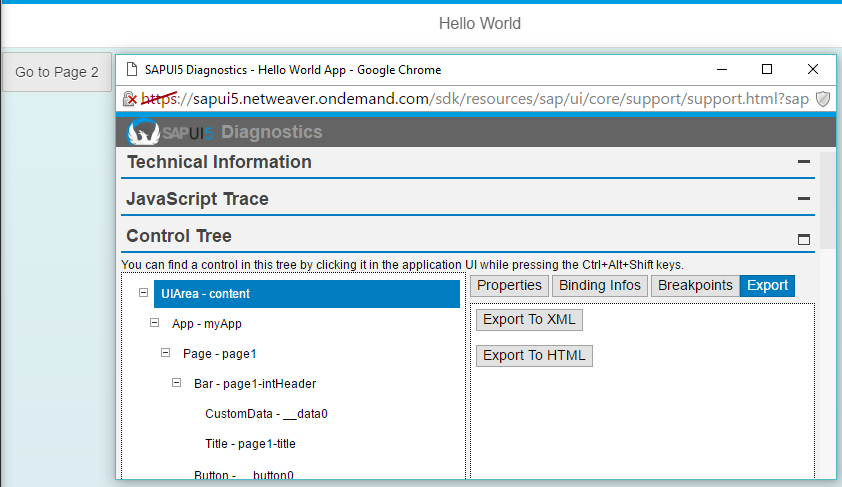
Now navigate to the „Control Tree“ tab and select the „UIArea“ node. The „Export To XML“ option is now available via the export function. The conversion is carried out by a click and downloaded as a ZIP file. If the application does not contain a view, the entire content of the application is packed into an XML view. If the application contains views, a separate file is created for each view. Now you can use the sample code in your own application, which is based on XML Views.
<sap.ui.core.mvc:View controllerName="XMLViewController" xmlns="sap.m" xmlns:sap.ui.core.mvc="sap.ui.core.mvc" > <App id="myApp" initialPage="page1"> <pages> <Page id="page1" title="Hello World"> <content> <Button text="Go to Page 2"></Button> </content> </Page> <Page id="page2" title="Hello Page 2" showNavButton="true"> </Page> </pages> </App></sap.ui.core.mvc:View>

Hi,
You usually find only .js views for SAPUI5 and you want to convert them to XML. I exactly have the opposite problem. The whole documentation with sample code has XML views. However, the project I am working on is already built in SAPUI5 using .js views. So, would you please point me to these SAPUI5 .js view resources?
export to XML or export to HTML button doesn’t work at all