

If you are using the Launchpad in SAP Enterprise Portal for Employee Self Services, you usually copy the SAP standard Launchpad Role ESS (instance MENU). Then you probably amend, remove or add folders and apps to match your requirements. However, in most cases you’d leave the system alias on it’s out-of-the-box value SAP_ESS_HumanResources. In that case, you won’t experience this issue and navigation within travel management works fine. The problem starts, if you want to use a different system alias for some reason…
…most notably because you need to connect the Portal to more than one ESS system. So, you may have a launchpad for each backend system – each with it’s own distinct system alias. This works fine for many apps. However, if you Open ESS Travel and Expense through that launchpad, for example on the overview page ‚My Trips and Expenses‘ and then try to access, say, an existing trip request from that overview screen to change it, you hit a portal run-time error. Why’s that?
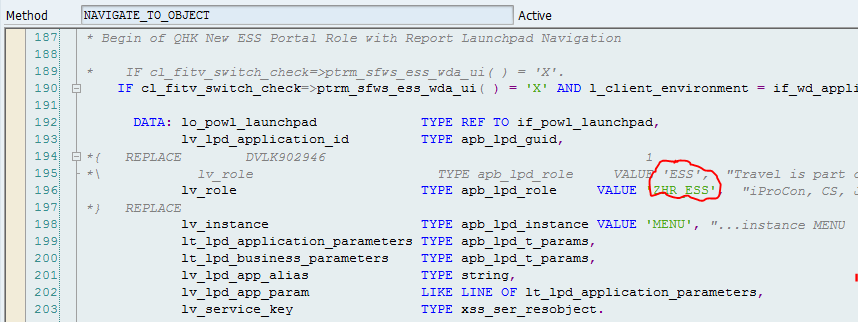
The problem resides in method NAVIGATE_TO_OBJECT in class CL_FITV_NAVIGATION. In this method, launchpad role ESS and instance MENU are hard coded in the algorithm to determine the system alias. As you are using a custom alias in a custom launchpad role, this request fails, because it’s using the wrong system alias. Certainly as poor a coding practice as you can imagine, but as it stands there is no solution provided via note from SAP yet.
Fortunately, if you use a modification, the solution is very simple. You just replace the launchpad role in line 194 of the standard coding as indicated in the following screenshot. If applicable, do the same for the instance key in line 195.
And then the navigation should be working fine again.