

We recently hit an issue stopping us from setting up Workforce Analytics (WFA) and Online Report Designer (ORD) in SuccessFactors for new Instances on the data center in Ashburn (DC8). If you have the same problem: here’s how to solve it…

Activate Workforce Analytics (WFA) and Online Report Designer (ORD) in SuccessFactors
New Sales Demo Instances from SuccessFactors will be hostet by DC8 for now. Please follow the guidelines provided in the Partner Demo Forum which called „DC8 Analytics Parameters“. After that you should also check following settings in Provisioning and amend accordingly:
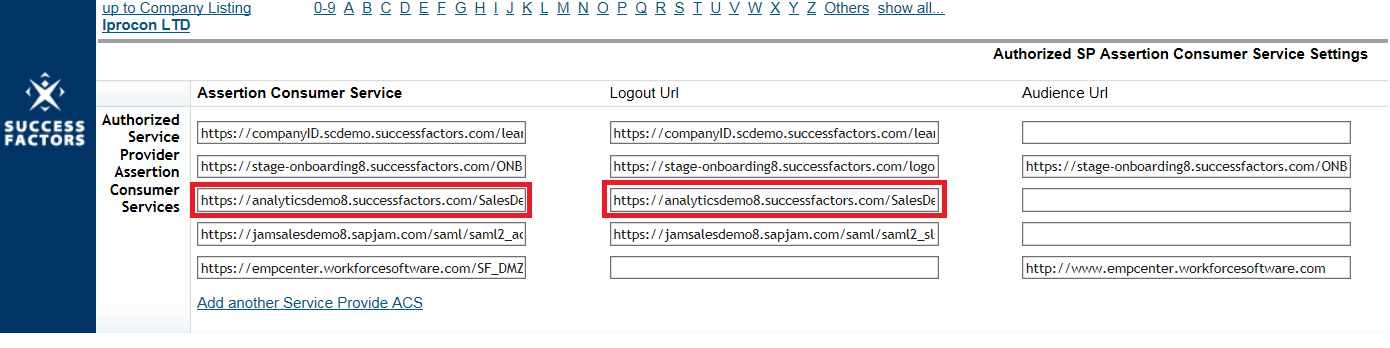
Provisioning > Choose company > Service Provider Settings > Authorized SP Assertion Consumer Service Settings
- Assertion Consumer Service = https://analyticsdemo8.successfactors.com/SalesDemo/Login.aspx
- Logout Url = https://analyticsdemo8.successfactors.com/SalesDemo/HrmlLogout.aspx
Unfortunatelly this part is not mentioned in the normal documentation. Therefore I have to thank Laesa Bolwell, who helped us out with this information. After these steps you should be able to activate, test and demo WFA and ORD. I am looking forward to present you more insights in our Reporting Series for SuccessFactors soon.


Thanks – this is awesome
You rock – thought that it was an error in my end – Anders Bang Christoffersen